

Starting Your First Site: 5 Most Important Things for a Website
Written by Holly Close
Published on October 29, 2025
Written by Eggs, Not Robots
Table Of Contents
A website is a powerful tool. Having your own little corner of the internet, away from the algorithm overlords and endlessly changing “rules” of social media platforms, is wonderful. A space to talk to potential customers exactly how you’d like, with no character limits or trending audio required.
However, in practice — and we say this from experience — the nitty-gritty of building your online presence can feel overwhelming.
In this blog, we’ll bypass the whelm and share our advice on the 5 most important things for a website (especially when you’re building it yourself). We’ve distilled down our expertise in web design, copywriting, digital strategy, and SEO into a straightforward plan that you can follow step-by-step to get you and your business online.
We’ve even made it into a website launch checklist that you can download for free ✅
Does this already sound like more work than you want to take on yourself? Our Squarespace website package might be just what you need to tick ‘make a website’ off your to-do list.
Preparation for Building Your First Website
Before we get into the 5 most important things for a website, there’s a little bit of prep to do first. Just like weighing out your ingredients before you bake a cake, or prepping a road trip route that hits all the best service stations, this step will make the process much easier.

Get Organised
Having all the information you need for your website in one place will make this whole process a lot smoother.
So before we do anything else, let’s get organised:
- Go to your file manager of choice (we like Google Drive, as it’s good for collaboration, but you could use Dropbox or the files system on your computer)
- Make a new folder called ‘Website’
- Within that folder, create these subfolders:
- Copy
- Branding
- Images
- Admin
- If you’ve already done any work towards creating your website, find those bits and bobs and move them to the relevant folder.
You can adjust these to suit your workflow and the tech you like to use, but the bottom line is to have it organised.
Get support and solidarity as you build your biz by signing up to our fortnightly newsletter: The Highly Emotional Business Owner
Create A Rough Plan (Sitemap)
A sitemap may sound fancy, but it’s simply a rough plan of the pages you want on your website. It will also form the basis for the navigation menu at the top of your site.
You also don’t need posh software — you could draw it out on a piece of paper (like our scrappy example here) or create it in a spreadsheet or document.
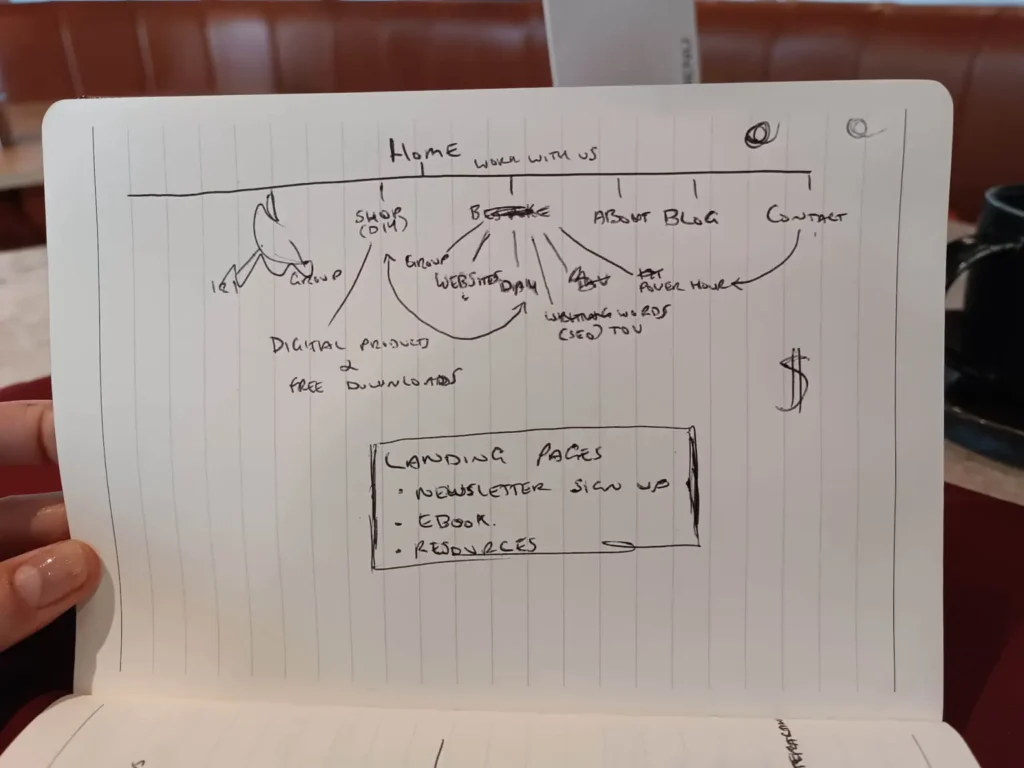
Your sitemap can be very small, especially when you’re starting out; it might only be four pages. You can also add to your sitemap as your business grows — don’t feel like you have to anticipate every page you might ever want.
Here are some ideas of pages you might want to include 👇 Starred pages are ones we consider essential; others will depend on your business.
- Homepage *
- About *
- Contact *
- Services AND/OR Shop*
- Blog
- Any other pages relevant to your biz
The 5 Most Important Things for a Website
With your website broken down into your sitemap, you’re now ready to start fleshing it out with the 5 most important things for a website:
- Copy
- Images
- Branding
- Writing a privacy policy
- Picking a website builder & buying a domain name
We’d recommend leaving 4 and 5 until last, but you can complete the first three in any order you like.
We’ve condensed all this info into a handy two-page checklist (or Notion template) that you can save and work through at a pace that suits you ✅
1. Write Your Copy
Using your sitemap as a guide, write the copy for each page and save it in your ‘Copy’ folder. If you’ve got blank page fear about how to start describing your biz, it might be helpful to consider your brand words or create a short tone of voice document.
It feels tempting to start with the homepage, but we normally leave that til last, for a few reasons:
- You’ll want to get warmed up before you tackle your homepage, as it’s the most important page on your site.
- Your homepage should act like a noticeboard for the rest of your site, leading your visitor to all the juiciest content. Since you’ll have already written all these pages, it should feel easier to create the relevant sections on your homepage. You don’t need to start from scratch – you can introduce or summarise the key features from the content you’ve already done.
Other things to consider when putting together your content…
- Guide prospective customers around your site by including a button or call-to-action (CTA) at the bottom of each section. You don’t want them to be confused about how to buy.
- Make a note of any additional information you’d like to include, like social media links, business hours, a contact form, newsletter subscription box, or your booking calendar.
- Include customer testimonials or online reviews if you have them – this kind of social proof helps build trust in you and your brand.
- Don’t forget descriptions and product reviews if you’re creating an online store.
If you plan on having a blog, make sure you have at least three posts ready to go. - We won’t go into detail on SEO (search engine optimisation) here, as it’s a big topic, but keep in mind that Google’s search engine rankings are based on high-quality content. For that reason, try to avoid using ChatGPT to write all of your copy, as it can be generic, unoriginal, and spammy, which Google doesn’t like.
Struggling to write your own copy? There’s a Good Egg who can help!
2. Gather Good-Quality Images
The next of our 5 most important things for a website is imagery. Photos and illustrations add pizzazz and interest to your site, but they need to be good quality, or folks will be put off.
Here’s what we mean by good quality:
- It’s not a blurry, low-resolution screenshot
- It’s in the right kind of format (JPG is best, or PNG if you need a transparent background)
- You have the right to use it — either because you created or commissioned it, or you got it from a stock image website (more on these below)
And these are the kinds of images you’ll need to gather:
- A simple logo (your business name in your font is fine as a placeholder).
- Ideally, your own brand photos — visitors prefer these over stock images.
- Even if you can’t do a full-on photoshoot yet, try to have one nice, professional-looking photo of yourself to go on your homepage and about page. These help people to connect with the real-life human running your biz (aka you).
- If you’ve not got brand photos yet, you can get free stock imagery as placeholders. We’ve written a blog on where to find diverse free stock images, which might help.
Once you’ve gathered your images, optimise any photos using an image optimiser like TinyPNG — it makes the file sizes smaller without losing quality, by removing colours that aren’t perceptible to the human eye.
Having smaller file sizes is better for page load times and for the carbon footprint of your website, because it takes less energy for internet users to view the page. We’ve written more about this in our blog on website sustainability.
Then save all of the photos to your ‘Images’ folder and your logo in your ‘Branding’ folder.
Need a helping hand with any of these steps? Have a free 15-minute chat with us to get unstuck.
3. Pick Basic Branding (Colours and Fonts) to Use Throughout Your Site
Branding is the third of our 5 most important things for a website. If you’re still at the early stages of building your biz, you can create really effective branding with just a few brand colours and some fonts. You don’t need to get bogged down in design trends — these are enough to get you started, and you can figure them out yourself for free 💸
Brand Colours
Colour psychology is a great place to start for choosing your brand colours. HubSpot breaks down colour psychology in more detail, but in a nutshell, different colours evoke different feelings in your target audience, and you can harness that for your business and website.
For example, we chose orange as our main Good Egg colour, as it evokes warmth, friendliness, and creativity, and shows our sunny, non-corporate energy.
Equally, there might be colours you want to avoid, if they clash with your brand personality or Ideal Customer Profile. If you run a zen yoga studio, you probably don’t want bright reds or yellows in your palette, as these don’t create relaxing or peaceful vibes.
Once you’ve got an idea of a colour or two that you’d like to use as the centrepoint of your brand palette, you can use the Coolors.co palette generator to get some combinations.
You don’t need to go wild with colours, though. Two main colours, a light colour, a white, and a black are a good start. Here’s a previous Good Egg colour palette as an example.
You might have spotted that our black and white aren’t pure black (#000000) or pure white (#ffffff). That’s because pure black and white can be harsh to look at, especially for a long time. It can cause eye strain and also be hard to read for people with cognitive disabilities, like dyslexia.
We’ve got more easy-to-implement tips on how to ensure your colour palette and web design create a great user experience in our blog on website accessibility.
Once you’ve decided on your palette, download it and add it to your ‘Branding’ folder, so you can refer back to it and have consistent branding throughout your site. Having a slightly different shade of green on every page isn’t effective branding.
Font Pairings
If you’re DIY-ing your branding, stick to picking fonts that are available through Google Fonts, as these are available as standard in most website builders, and you won’t have to faff around with licensing or downloading font files.
Like with colours, pick your font based on the vibe of your site. Elegant serif fonts wouldn’t suit a fun, youthful brand, whilst whimsical handwritten fonts wouldn’t work well for a dentist. PageCloud has curated 50 font combinations to suit a wide range of aesthetics.
We recommend selecting one font for your headings and another for your body text. And be sure to pick a font that’s clear and legible — those swirly calligraphy fonts look lovely, but can be hard to read.
Already got your branding but no idea how to implement it on your website? We can build you a bespoke Squarespace site (with copy and SEO), all for just £1,450.
4. Write a Privacy Policy
A privacy policy lets people know how you’ll use their data, where it’s stored, and how they can control the data you have about them. Your policy terms should also include information about payment processors and mailing list providers, as well as any other platforms where you collect or store data.
Privacy policies are a legal requirement in the UK if you collect any data from visitors, which is why we’ve included it as one of our 5 most important things for a website.
The ICO has a helpful article about writing your own privacy notice, or you could generate terms using compliance software like Termly.
If you’re dealing with a large amount of sensitive data or financial information, we recommend either purchasing templates created by a legal professional or seeking professional legal advice.
5. Pick Your Website Builder and Buy Your Domain Name
Now you’ve gathered all your content, we’re ready for the final step of the 5 most important things for a website… you’re ready to pick a website builder and buy your domain name. It sounds technical, but your domain name is just your website address — ours is goodegg.digital. Having a domain name also allows you to create a company email address, rather than having to use a Gmail or similar.
Tips For Choosing Your Website Builder
If you’re still at the frantic Googling stage of building a site, you might have come across a lot of folks telling you to create your site on Shopify or Framer or Webflow or another platform that’s supposed to be “the best”.
We firmly believe that the best platform for your website is the one you feel happy using and confident updating, which is why we build our sites across a couple of platforms, depending on what our clients need. After your own research, you might find you like a completely different builder, but here’s why we like Squarespace and WordPress 👇
Why We Like Squarespace
Pros
✅ Drag-and-drop builder with lots of templates to get you started
✅ Very user-friendly and easy to update (even if you don’t consider yourself techy)
✅ Squarespace takes care of the technical side, like hosting, backups, and updates
Cons
❌ Design options can be more limited and look more generic
❌ Committed to Squarespace’s pricing and hosting
❌ Lack of advanced features and integrations
Why We Like WordPress
Pros
✅ So much flexibility and choice on design
✅ Flexible hosting options, depending on budget and other priorities (like sustainability)
✅ Plugins available for pretty much anything
Cons
❌ Has a fairly big learning curve and can be overwhelming
❌ You’re responsible for your own hosting, backups, and domain name
❌ Plugins can be temperamental and don’t always play nicely together
Still feeling overwhelmed and want to talk through your options? Book one of our Free Sample calls get a little bit of support and figure out your next steps.
Buying Your Domain Name
We’ve suggested leaving this step until last, as some website builders, such as Squarespace, offer the first year of your domain name for free.
If it’s not included in your package, you will need to purchase your domain separately through a website like GoDaddy or Namecheap. Many of these sites will offer your first year for a very low price (99p or £1.99 is common).
Once your site is ready to launch, you’ll need to connect your domain name to your site. This is slightly different for every website builder and hosting provider, but you can use this query in your search engine of choice to find detailed help articles:
Connecting a [name of your domain provider] domain to [name of your website builder]
With both options, remember to factor subsequent years of non-discounted domain registration into your business budget (it typically costs around £20-£30 per year).
You’re Ready to Build Your Website 🎉
Now that you’ve gathered the 5 most important things for a website — copy, images, branding, privacy policy, and your choice of website builder — you’re ready to put them all together!
Take it slow and be kind to yourself — having an existential crisis whilst building your own website is very normal (even if you’re a web design and copywriting company 😉).
We’ve summarised all the tips in this blog, including the 5 most important things for a website, into a website launch checklist that you can keep coming back to and chipping away at.
And remember, even when it’s “finished,” treat your website like a garden and keep coming back and tending to it. It should be a living, breathing representative of your biz, not a statue gathering dust.
P.S. Just Because You *Can* DIY Your Website, Doesn’t Mean You Have To
Building your own website and writing your own copy might not cost you cash money, but doing it yourself could be costing you a lot in a different resource: time ⏰ 💸
If writing and web design aren’t your wheelhouse, the 30+ hours it takes to write your own copy and design your site might be better spent elsewhere…
With our Squarespace Website Packages, you can focus on the bits of your life and biz that you love, and we’ll take care of getting you online — all in less than eight weeks.
We bring all our web design and copywriting expertise to every Squarespace site, including our knowledge of SEO, responsive design, accessibility, inclusion, and sustainability.
Get our 5 most important things for a website as a free checklist, sent directly to your email.
More Cracking Reads About Interesting Things
A web design and copywriting duo putting the joy back into building a website.
Working and travelling worldwide, but proudly based in Yorkshire
Copywriting & web design created and built in-house by the Good Eggs | Branding by The Chatty Freelancer
© Good Egg Digital Marketing Limited 2026. Good Egg Digital Marketing is a limited company registered in England and Wales. Registered number: 13381584